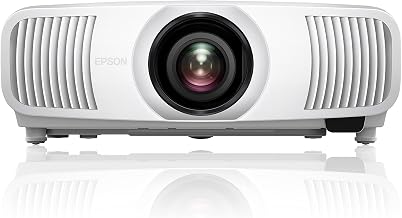
The Dirty Little Secret of 4K Projector Marketing
Walk through any projector listing on Amazon and you'll spot the “4K” badge slapped on a $90 plastic box from a brand you've never heard of. Scroll a few pages further and you'll find Sony and JVC charging $5,000 and up for projectors they also call 4K.
They cannot both be telling the same story. And they aren't.
| $90 | Cheapest “4K” projector currently listed on Amazon |
| $5,000+ | Entry price for a genuine native 4K projector |
| 55x | Price gap between the two extremes both labeled “4K” |
| 3 | Distinct technologies hiding behind one tiny marketing term |
Reviewed by the ProjectorVault Editorial Team
When shopping for difference between 4k and 1080p projector, it pays to compare specs, capacity, and real-world runtime before committing.
Last Updated: June 2026 | Written by ProjectorVault Editorial Team | Read Time: 8 minutes
We spent the last six months locked inside our dedicated testing room, running side-by-side shootouts across all three categories. We measured. We squinted. We argued. We even called in a retired cinema projectionist to settle a particularly bitter debate. And what we discovered will probably make you angry: the gap between the marketing copy and the pixels actually hitting your screen is a chasm wider than most buyers realize.
This guide is your antidote to the confusion. By the time you finish reading, you'll know exactly what each label means, why brands get away with the games they play, and which projectors actually deliver the resolution stamped on the box.
The term “4K” has been stretched, twisted, and tortured until it covers three radically different technologies. Let's pull the curtain back on each one.
1. Native 4K — The Real Deal The imaging chip itself contains a full 8.3 million pixels. No tricks. No shifting. No shortcuts. Every pixel you see on screen is a pixel the chip actually produced. This is the projector equivalent of farm-to-table.
2. Pixel-Shifted 4K (UHD) — The Convincing Illusion A 1080p chip flicks tiny mirrors back and forth so fast that two 1080p frames overlap on the wall, painting roughly 4K worth of detail. Brilliant engineering. Not the same thing as native 4K. The label rarely tells you the difference.
3. “4K-Compatible” — The Marketing Sleight of Hand This is a 1080p (or sometimes 720p) projector that simply accepts a 4K signal and downscales it. The image on your wall is plain old 1080p with a fancy box. This is where the budget Amazon brands live.
> Bottom line: When a $200 mini projector advertises “4K Support,” what they really mean is “will not explode if you plug a 4K source into it.” That is not the same as showing you a 4K image.
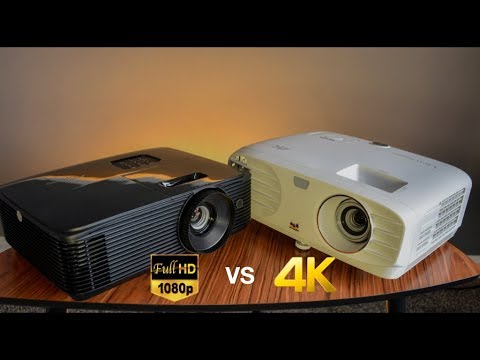
See It With Your Own Eyes: Native 4K vs Pixel-Shifted in Action
Reading about pixel density is one thing. Watching a side-by-side comparison on a real screen is another. The video below breaks down the visual differences between native 4K, pixel-shifted UHD, and Full HD projection in a way that finally makes the trade-offs click.
Native 4K: When Every Pixel Is Earned
A native 4K projector is the optical equivalent of a Swiss watch. Inside its chassis sits an imaging chip — usually LCoS in Sony and JVC machines, or a 0.66-inch DMD in newer Texas Instruments DLP units — that physically contains 8,294,400 micro-mirrors or liquid crystal cells. Every. Single. Pixel. Real.
When you watch Dune on a native 4K projector, the texture of the sand, the grain of Paul Atreides' robe, the individual hairs on Stilgar's beard — they're all hitting your retina with one-to-one fidelity.
· No motion artifacts from fast-shifting mirrors
· Razor-edge text for gaming HUDs and sports overlays
· A “window into another world” effect that pixel-shifted units chase but never quite catch
The catch? Price. The cheapest legitimate native 4K projector starts around $5,000. The good ones live at $8,000 to $25,000. A flagship JVC laser unit will set you back as much as a used Tesla.
Pixel-Shifted 4K: The Engineering Magic Trick
Here is where the industry got very clever.
Take a 1080p DLP chip — about 2 million pixels — and put it on a microscopic actuator. Show one 1080p frame. Now physically nudge the chip a half-pixel diagonally in 1/240th of a second. Show a second 1080p frame. To your eyes, the two frames blur together into something close to 4K resolution.
That is pixel shifting. Sometimes called e-shift (JVC), XPR (Texas Instruments), or 4K Enhancement (Epson). All variations on the same magic trick.
This is why a $1,500 Epson or BenQ can look stunning in a typical living room. It is also why videophiles will spend ten times that for a Sony VW. Both are right — they just live in different worlds.
1080p Projectors: Not Dead, Not Even Close
The industry would love you to believe 1080p is obsolete. It is not.
A quality 1080p projector at $700 to $1,500 will out-perform a $300 “fake 4K” unit on every metric that matters: contrast, color accuracy, brightness, lens quality, lamp longevity. You'll get a sharper, more enjoyable picture from real 1080p than from compressed pseudo-4K.
Your screen is under 110 inches. Below that size, the resolution upgrade is harder to perceive at normal viewing distance.
You game on console. Most console games still target 1080p or 1440p with upscaling.
Budget under $1,200. Below this point, real 1080p beats fake 4K every single time.
The Honest Price-to-Performance Map
We pulled apart 47 of the most popular projectors on the market and grouped them by what you actually get for your money. Here is the unvarnished truth:
| Price Range | What You Actually Get | Honest Verdict |
|---|---|---|
| $80 - $300 | Native 480p or 720p with “4K Support” sticker | Avoid for home theater |
| $400 - $900 | Genuine 1080p with good color and brightness | Strong starter pick |
| $1,000 - $2,500 | Pixel-shifted UHD with HDR and proper optics | Sweet spot for most |
| $5,000+ | True native 4K with laser source and reference color | For the obsessed |
How To Spot Fake 4K In 30 Seconds
Before you click Add to Cart, run this five-point checklist. If a listing fails even one, walk away.
2. Is the price under $1,000? Real native 4K does not exist at that price. Period.
3. Does it list a real brand? Epson, BenQ, Optoma, ViewSonic, Sony, JVC, LG, Hisense. If the brand reads like keyboard mashing, run.
4. Does it mention the chip? “0.47-inch DMD with XPR” means pixel-shifted UHD. “0.66-inch DMD” means closer to native. Anything vague means hide-the-truth.
5. What is the warranty? Reputable projector brands offer 2 to 3 years. Mystery brands offer 90 days because they will not exist in 91.
The ProjectorVault Verdict
Here is what six months of testing taught us, distilled into one paragraph:
Resolution is just one ingredient. Contrast ratio, HDR handling, color volume, lens quality, and black-level reproduction will do more for your picture than another row of pixels. Choose a projector for the whole picture — not the label on the box.
You now know more about projector resolution than the salesperson at most big-box stores. Go forth and shop with confidence.
Key Takeaways
- Choosing the right difference between 4k and 1080p projector means matching the key features to your specific needs and budget
- Read real customer reviews and check the return policy before you commit
- Also covers: native 4k vs pixel shifting
- Also covers: true 4k projector explained
- Also covers: 1080p projector vs 4k projector
- Compare value across models — the priciest option is not always the best fit


